ComposerUI
ComposerUI is the official visual workspace for Muffakir. It provides an intuitive, web-based interface to design search spaces, configure pipelines, run automated hyperparameter evaluations, monitor live trials, and analyze winning architectures without writing orchestration boilerplate.
Starting the server
To install the optional web interface dependencies and start ComposerUI:
[!TIP] You can also use the alias
muffakir serve. ComposerUI runs onhttp://127.0.0.1:2811by default. If that port is already in use on your machine, specify a custom port:
Once launched, navigate to http://127.0.0.1:2811 in your browser.
Step 1: Data & Pipeline Configuration
The first step establishes your RAG pipeline mode, retrieval knowledge source, and evaluation data.
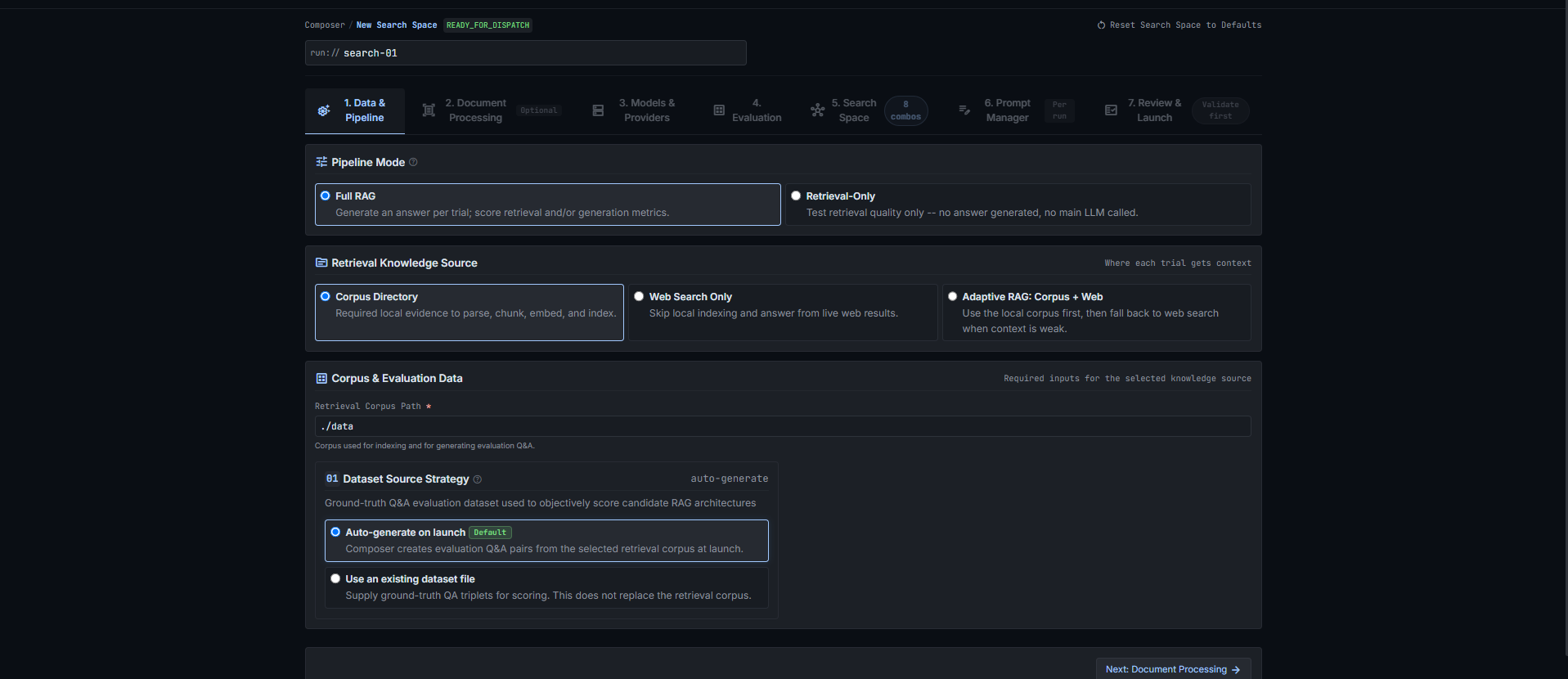
Pipeline Mode
- Full RAG: Evaluates the complete end-to-end pipeline (document retrieval followed by LLM answer generation). Computes retrieval metrics plus generation metrics (
faithfulness,answer_correctness, andllm_judge_rating). - Retrieval Only: Evaluates candidate retrieval without invoking the answer-generation LLM. Ideal for quickly benchmarking vector databases, embeddings, chunk sizes, and rerankers while saving LLM API tokens and runtime.
Retrieval Knowledge Source
- Corpus Directory: Evaluates documents from a local knowledge base (e.g. PDF, Word, or text files) indexed into your vector store.
- Web Search Only: Zero-corpus mode that evaluates live external search engines (Tavily, Firecrawl, SerpAPI) directly.
- Adaptive RAG (Corpus + Web): Hybrid fallback mode. Muffakir queries the local corpus first; if the context relevance checker grades retrieved documents as insufficient, it automatically invokes the web search provider and cites web sources.
Corpus & Evaluation Data
- Corpus Directory: The file system path containing your raw documents.
- Evaluation Dataset Options:
- Auto-generate on launch: Automatically invokes an LLM to generate synthetic Arabic/English Q&A evaluation pairs directly from your corpus before search trials begin.
- Use an existing dataset file: Supply a path to a pre-existing test dataset in
.jsonl,.csv,.xlsx, or.jsonformat.
Step 2: Document Processing & OCR
The second step configures document ingestion, text extraction, and OCR engines.
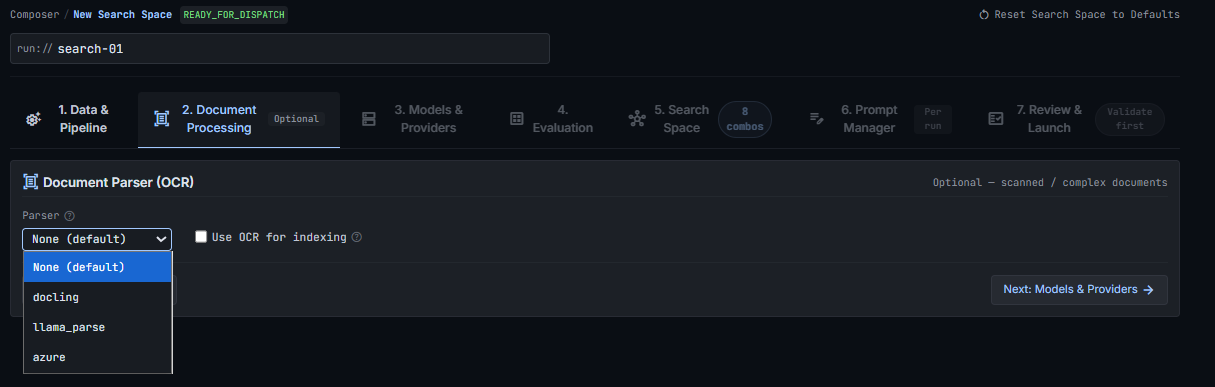
Document Parsers
- Structured Library (Default): Fast, zero-credential local parsers using standard Python document libraries (PyPDF, PDFPlumber, Unstructured, docx2txt). Best for clean digital PDFs, Word documents, and text files.
- Azure Document Intelligence: Microsoft cloud parser providing high-precision Arabic OCR, form layout extraction, and table structure recognition.
- Docling (IBM): Advanced open-source parser specialized in layout recognition, reading order preservation, and clean Markdown extraction for dense technical and tabular documents.
- LlamaParse: Specialized LLM-optimized cloud parser designed for complex multi-column documents and presentation decks.
Parser Options
- OCR Language Codes: Set language priorities (e.g.
ara,eng). - Table Structure Recognition: Enables structured table parsing into markdown or HTML representations.
- API Credentials: Supply endpoints and keys for cloud-based OCR providers.
Step 3: Models & Providers
The third step defines your default generation LLM, embedding models, and vector database backends.
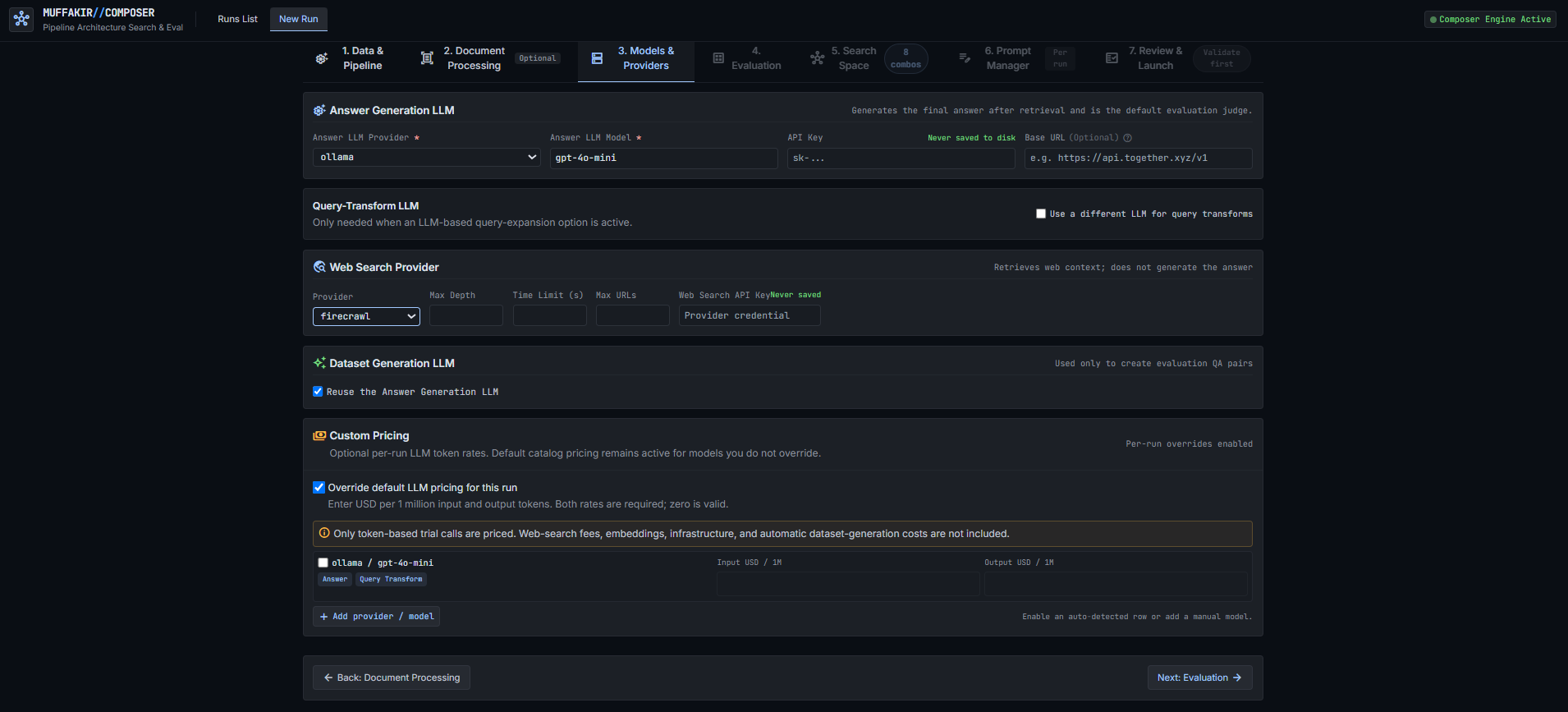
Generation LLM
- Supported Providers: OpenAI, Together AI, Groq, Anthropic, Google Gemini, Ollama (local models), and vLLM / custom OpenAI-compatible endpoints.
- Shared Parameters: Configure validated LLM parameters including
temperature,max_tokens(labeled Maximum output tokens),top_p,stop(as a list of strings),seed,top_k,frequency_penalty,presence_penalty,timeout_seconds, andmax_retries(labeled Provider request retries). See LLM providers in ComposerUI for complete provider capabilities.
Embeddings & Vector Storage
- Embedding Provider: Select between Sentence Transformers / Hugging Face local embeddings (e.g.
mohamed2811/Muffakir_Embedding), OpenAI embeddings, or Cohere. - Hardware Acceleration: Set device preference (
auto,cuda,cpu). - Vector Database: Choose your backend—
chroma(embedded local store),qdrant(high-performance vector engine),faiss(in-memory indexing),milvus, orpinecone.
Step 4: Evaluation Metrics & Judges
The fourth step configures the evaluation suite and scoring weights used to rank candidate architectures.
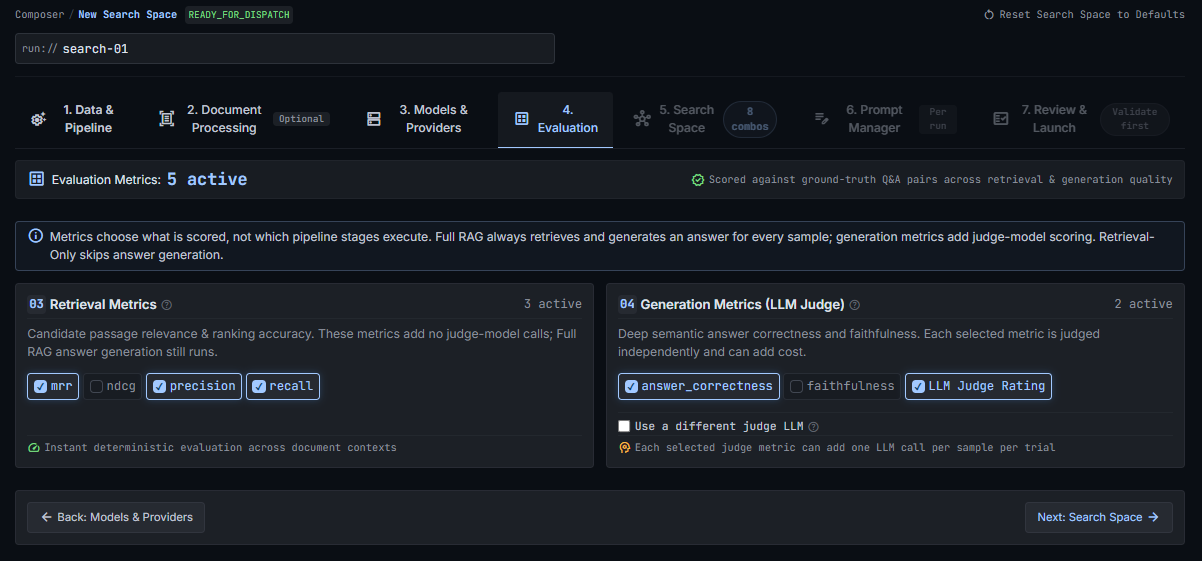
Metric Selection
- Retrieval Metrics:
recall: Binary single-gold hit in top-k chunks.precision: Proportion of retrieved chunks relevant to the gold context.mrr: Mean Reciprocal Rank (1/rank) of the first relevant chunk.ndcg: Normalized Discounted Cumulative Gain accounting for position discount.- Generation Metrics:
faithfulness: Strict context grounding verification (detects hallucinations).answer_correctness: Continuous semantic similarity score (0.0 to 1.0) against reference answers.llm_judge_rating: Discrete 1–5 integer rubric measuring factual accuracy and completeness.
Metric Weights & Composite Scoring
Use the interactive sliders to assign weights to each active metric. Composer calculates a normalized composite score (0.0 to 1.0) for each trial:
- Each weight (
w) is normalized automatically so all assigned weights sum to 1.0 (100%). - Candidate architectures on the leaderboard are ranked by their final composite score.
- LLM Judge Rating (1–5 scale) is linearly normalized to
0.0 – 1.0when factoring into the composite score (Rating 1 =0.0, Rating 3 =0.5, Rating 5 =1.0), while its raw score (x.x / 5) is preserved in reports and detail views.
Independent Evaluation Judge
To eliminate evaluation bias, you can configure an independent, high-capacity judge model (such as GPT-4o or Claude 3.5 Sonnet) specifically for grading generation metrics, even when testing smaller or locally hosted models in the RAG pipeline.
Step 5: Search Space & Constraints
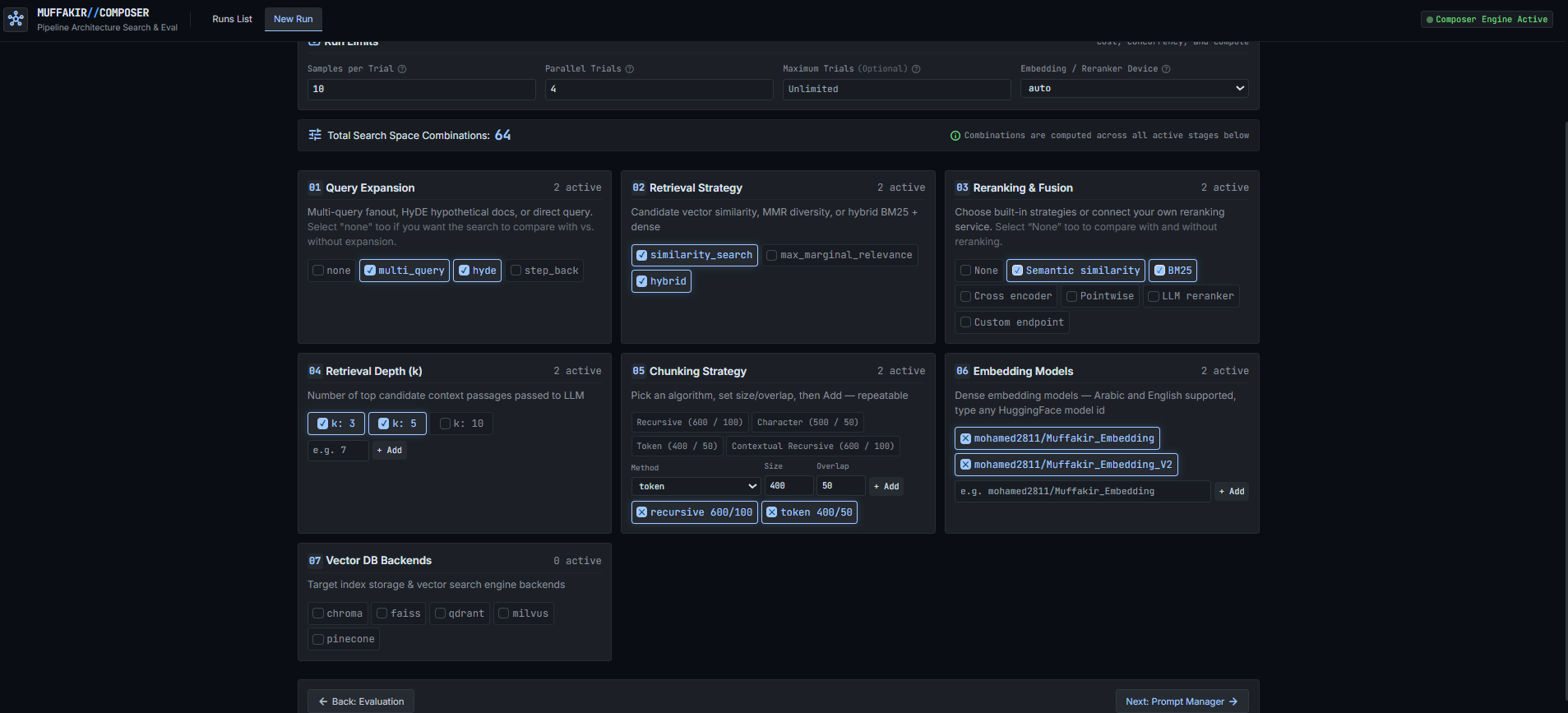
The fifth step defines the combinatorial hyperparameter grid to explore.
Search Space Dimensions
Select the options you wish to benchmark across your pipeline stages:
- Query Expansion:
none,rewrite,multi_query,decomposition,hyde,step_back. - Retrieval Strategies:
similarity_search,max_marginal_relevance(MMR),hybrid(dense + BM25),contextual. - Reranking Methods:
none,semantic_similarity,bm25,cross_encoder,pointwise,llm. - Reranker Models: Local Hugging Face models (e.g.
BAAI/bge-reranker-base,BAAI/bge-reranker-v2-m3). Composer intelligently expands models only for model-based rerankers without creating redundant trials for other methods. - Top-k Depths: Test different candidate chunk quantities (e.g.
3,5,8,10).
Live Combination Counter
The badge in the tab bar updates in real time to display the total number of trial combinations formed by your selections.
Execution Controls
- Worker Processes (
n_jobs): Adjust the number of parallel workers for multi-core evaluation. - Max Trials: Set an optional cap to terminate search after N evaluated trials.
- Max Runtime: Specify a maximum wall-clock runtime in minutes.
Step 6: Prompt Manager
The sixth step allows live inspection and fine-tuning of system prompts across all stages.

Features
- Base Language: Toggle between Arabic (
ar) and English (en) prompt bases. - Stage Customization: Inspect and customize default prompt templates for:
- Answer generation (
rag_prompt) - Query transformation (
query_rewrite,multi_query_expansion,hyde,step_back) - Evaluation judges (
answer_correctness,llm_judge_rating,context_grounding) - Placeholder Contract Validation: ComposerUI automatically validates that required prompt placeholders (such as
{context}and{question}) are preserved, preventing runtime formatting errors.
Step 7: Review & Launch
Before launching, the review panel presents a complete summary of your run configuration, active providers, and estimated trial count.
Click Dispatch Run to launch the search in the background. Completed trials are saved atomically to checkpoints, allowing runs to be paused, resumed, or recovered seamlessly.
Final Results & Diagnostics
Once a run is launched or completed, the Run Details page provides comprehensive analytics, trade-off curves, and diagnostic drilldowns.
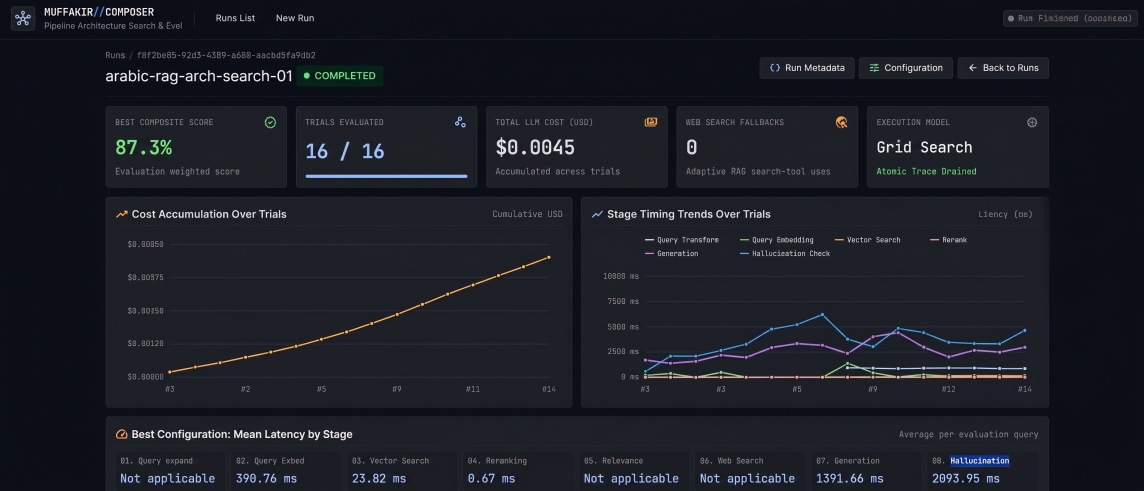
1. Winning Architecture Card
The top banner highlights the optimal pipeline configuration with the highest composite score, displaying its trial ID, composite score, and exact hyperparameter choices.
2. Trials Leaderboard
An interactive, sortable table listing all evaluated trials:
- Composite Score: Overall ranking score.
- Individual Metrics: Per-metric scores (recall, faithfulness, answer_correctness, llm_judge_rating).
- Performance & Cost: End-to-end pipeline latency, evaluation overhead, token counts, and estimated dollar costs.
3. Pareto Frontier & Multi-Objective Trade-Offs
The interactive Pareto chart plots Quality (Composite Score) vs. Latency / Cost. This helps identify architectures that provide the best speed-to-accuracy balance without being dominated by slower alternatives.
4. Sample-Level Inspector
Click into any trial to inspect individual evaluation queries:
- See the original question and gold answer.
- Inspect the transformed query generated during search.
- Review retrieved chunk previews and source attributions.
- Check whether the model triggered an Answer Refusal (answer_refusal: True/False).
5. Error Rate Observability
The observability panel monitors error rates across trials: - Groups failures by error code and exception type. - Tracks provider rate limits, network timeouts, or invalid judge responses. - Displays dataset generation failures and refusal rates.
6. Export a Trial to Python
In the trial inspector, click Export Python to turn any evaluated trial configuration into a runnable, production-ready project:
- Code Preview & Copy: Inspect the generated rag_app.py script directly in the UI.
- Download Python (rag_app.py): Download the standalone pipeline script.
- Download Project ZIP: Get a complete project archive containing rag_app.py, requirements.txt, .env.example, .gitignore, and a setup README.md.
See the dedicated Export a trial to Python guide for instructions on running and deploying exported projects.
7. Artifact Downloads
Download search run data directly from the UI: - Summary JSON: Machine-readable run configuration and aggregate metrics. - Samples CSV: Full row-level diagnostic spreadsheet with per-sample scores and timings for offline analysis.
See also
- Composer search guide — Programmatic Python API and search space mechanics.
- Export a trial to Python — Exporting any saved trial into a runnable project.
- Evaluation guide — Deep dive into metric mathematics and judge rubrics.
- Traces and observability — Detailed trial trace files and error monitoring.
- Public Python API —
MuffakirComposerclass reference.